Friction of the Fragmented Workflow
Project Mantle was born from a problem I was facing: a laptop overloaded with software. All of which I was using only a couple of features from, resulting in a high level of cognitive friction during any project or assignment. Eventually, my focus had been eroded between different UI paradigms, handling endless account/app notifications, and navigating broken trust around corporate data security and software stability. I had personal and educational resources spread across various software and thus various organisations. Some of these included Apple, Google, Microsoft, and Monday. All of which have different workflows and syncing abilities, and want you to use their software portfolio as your only tool suite. I had just started thinking about local-first alternatives, but was hesitant.
The turning point came after two hacks and data breaches of Instructure's Canvas. The primary tool used by Universities around the globe. This led to downed services for days, as well as breached and ransomed user data. Although this was not a breach of one of the various productivity tools I used. It was the ultimate reminder of the risks and vulnerabilities that come with cloud services. But it is the intersection of poor data sovereignty and cloud dependency that results in a fragile system, where a user cannot reliably manage their own time or data. Not just presenting a security risk, but halting project momentum.
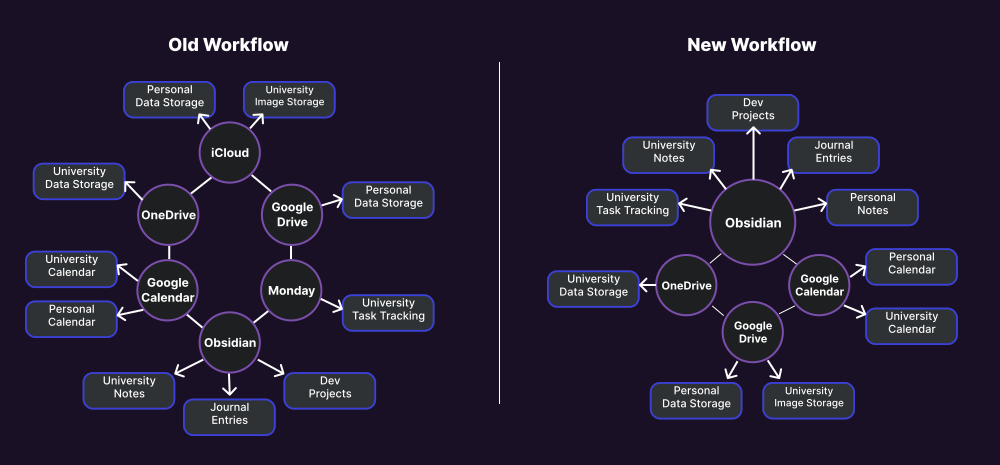
Comparison fragmented SaaS map
The Sovereign Developer
I had already decided I wanted to streamline my workflow and centralise much of the software I was using. Therefore, to solve my problem of a fragmented SaaS workflow, I identified three potential solutions:
Obsidian – Community
I was already familiar with Obsidian, as I used it for academic note-taking and personal project content creation. As well as being aware of the ecosystem of community-created themes and plugins. I identified multiple plugins that were aimed at solving my need for features that Obsidian does not provide by default. However, through some testing, I found these community solutions only partially provided the features I was requiring. For example, there was an existing Kanban board plugin. But without the ability to set a priority status, due date, or sync with a calendar. All of which I had come to use and thus expect from a task tracking platform, after coming from Monday. Because these were community solutions, I also had no roadmap or likelihood of future features being added or maintained.
Notion – Off-the-Shelf
On the other hand, Notion is a very established software. Of which I have come back to and left more times than I can count over the years. It essentially has all the features I required, but with some key limitations. Including over time, what has become a low limit for how much content you can have on a free plan. Although Notion has a distinct character, it is not one I have been able to stick with long-term in the past. So, although it achieves a lot, the Obsidian community plugins cannot. It would likely lead to requiring me to pay for a subscription in the future for more storage/usage, and I am not a fan of the UI and workflow.
Obsidian – Bespoke Development
Bespoke development offered a fully tailored experience under my absolute control, while preserving the foundational advantages of Obsidian—namely, high customisability and a local-first architecture. However, this path introduced a significant Time-to-Value Gap. Unlike off-the-shelf software, choosing to build a custom system required a demanding development runway, where immediate workflow optimisation had to be paused in exchange for long-term architectural sovereignty.
Outcome
Bespoke development stood out as the best path forward. It brought together the local-first and customisation from the community plugins. While also allowing me to develop the features that made Notion a strong candidate. Although I would need to develop said features, I would then also be in full control of them, and I would not have to worry about how my data was being handled while using them.
This decision was ultimately echoed while working on this very project. Google Drive crashed while trying to sync my project data. Leading to the loss of all project files I was actively working on. The only part of the project I didn't lose was everything that was located within my local Obsidian vault.
Radical Agility
During the development phase, I would have some strong advantages. As I embark on this project as a Sovereign Developer, I become the Product Manager, UI/UX Designer, Product Sponsor, and Software Engineer, creating an instant feedback loop. Unlike the typical problems that come with large organisations, such as communication and financial motives, which move very slowly. I can identify a workflow bottleneck, design a subtle micro-interaction (like cursor-tracking) to fix it, and implement the code without having to hold a meeting.
Scoping & Feasibility
To evaluate project feasibility, I mapped the required scope and potential costs by analysing my existing project management workflows in Monday.com. The Minimum Viable Product (MVP) for the Kanban board plugin was constrained to two core primitives: custom card properties and local content encapsulation. Essential task-tracking features, such as priority status and due dates, are treated as optional properties conditionally rendered within Obsidian, while progress indicators are built directly into the base plugin. Sub-tasks posed a unique Human-Computer Interaction (HCI) design challenge: whether cards should exist purely as board elements or as individual files. I resolved this by prioritising user autonomy: cards are board items by default, but can be converted into independent Markdown files with a single click.
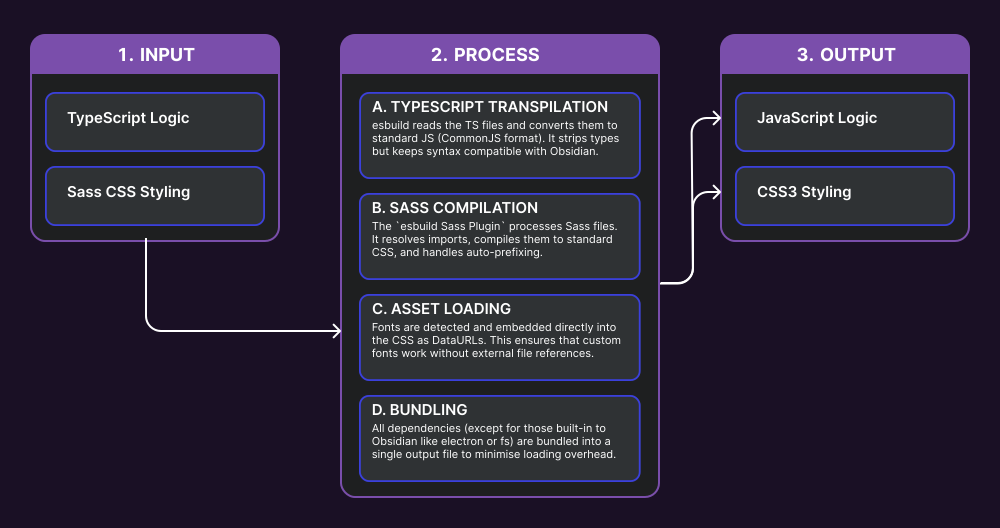
Project development build pipeline
Minimising financial costs and eliminating external data-flow infrastructure made local execution paramount. Instead of relying on standard API calls via AI Studio, I integrated the Gemini CLI, which offered rich out-of-the-box capabilities that reduced development time at no cost when structured correctly. Designing the plugin and the model to run entirely on the user's machine eliminates API overhead and data-sharing risks, shifting data control back to the individual. The trade-off for this local-first architecture is a higher technical barrier to entry that demands comprehensive setup documentation. However, from an audience perspective, users seeking this level of CLI integration in Obsidian generally have the technical curiosity and skills to navigate the setup.
Existing Cold Solutions
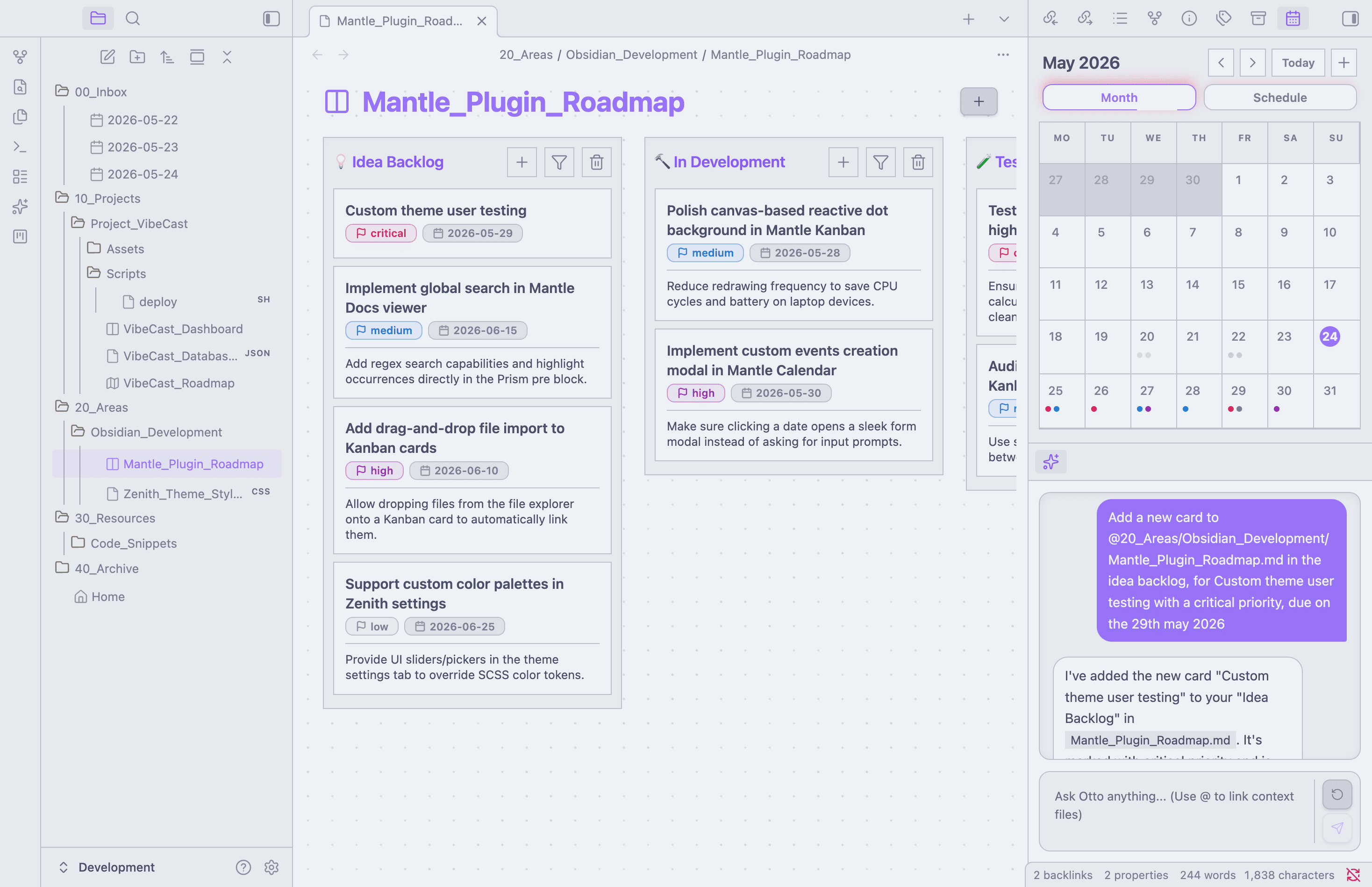
Community Theme Light Mode
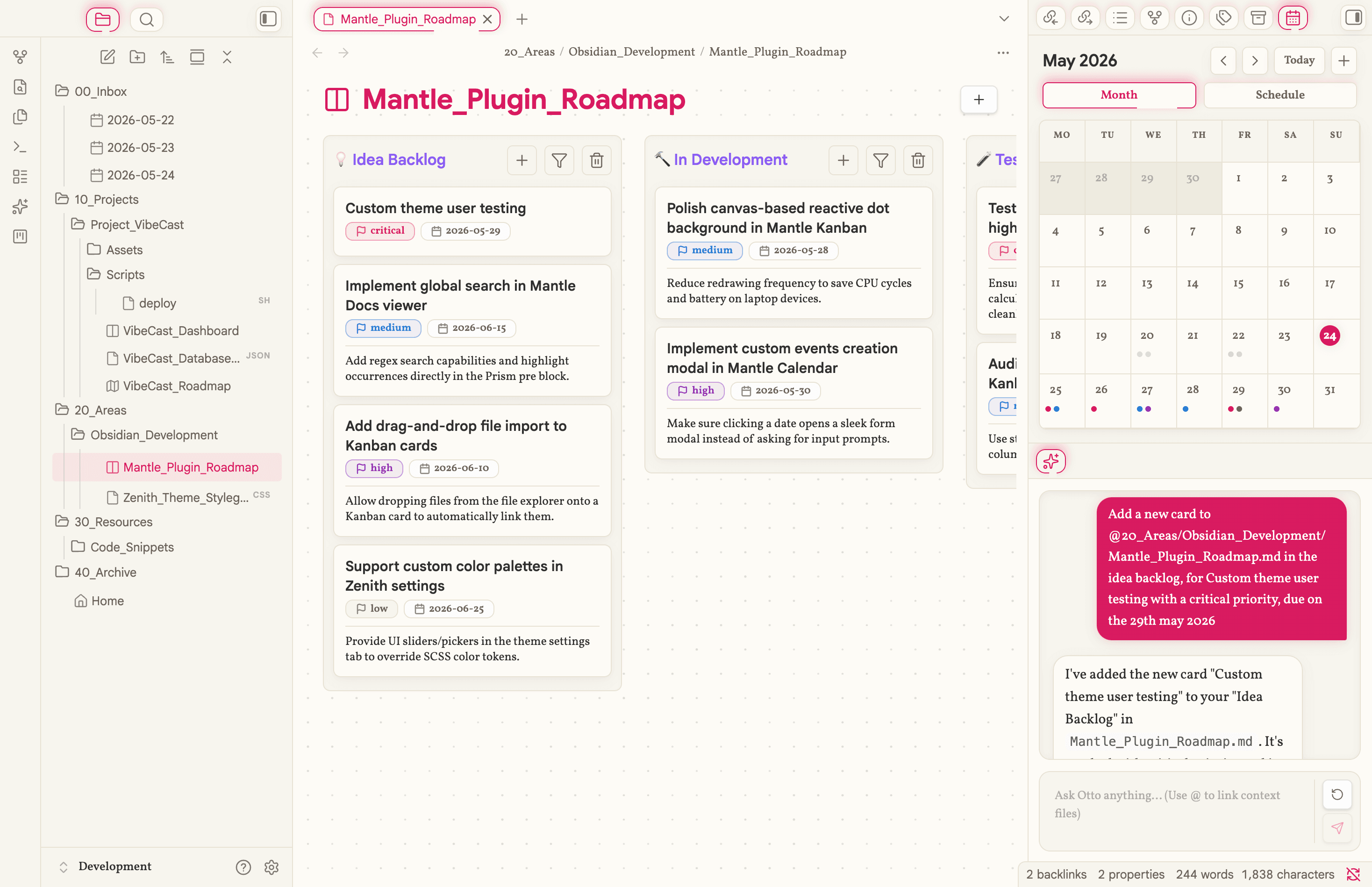
Zenith Theme Light Mode
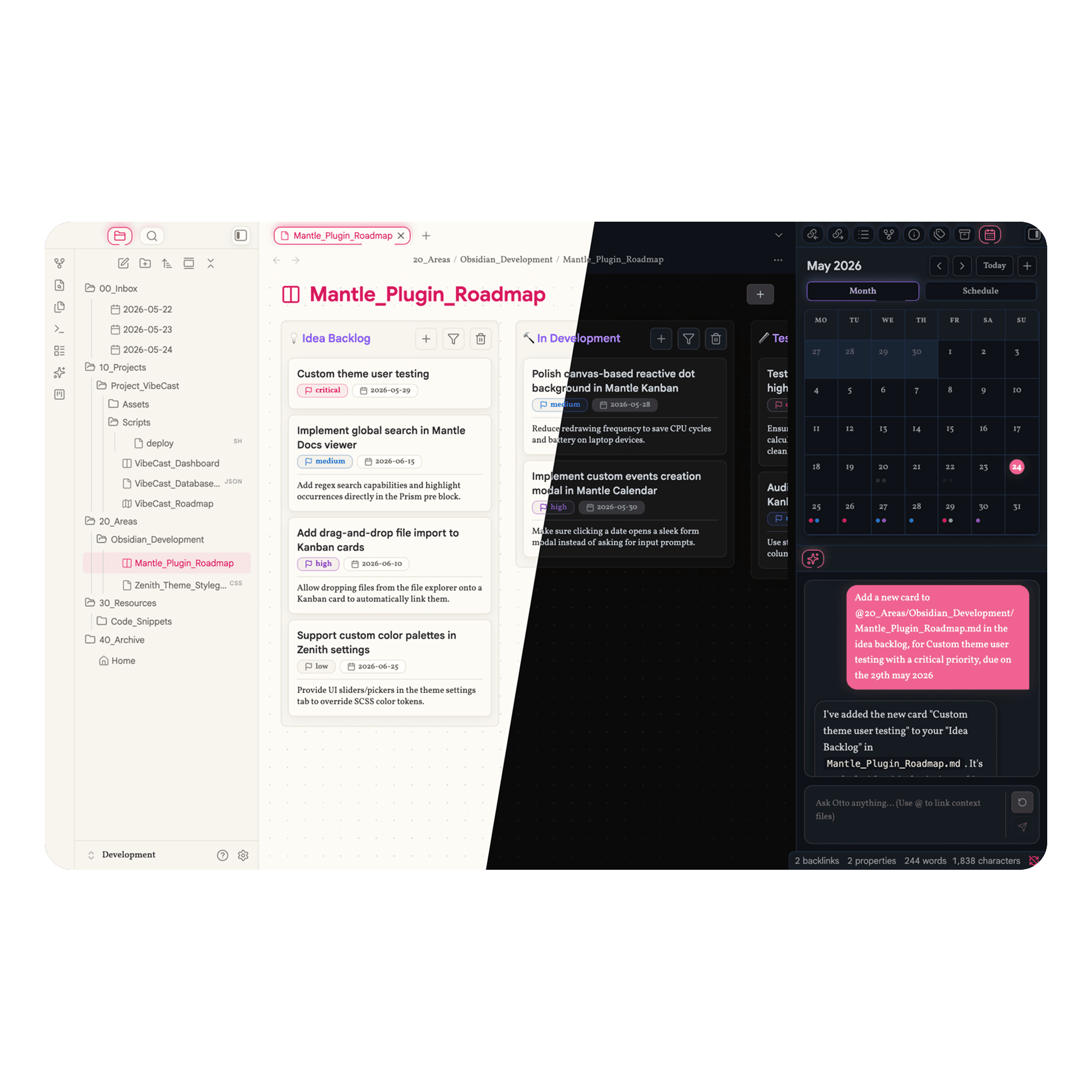
I approached the UI design with both my academic design experience and my own personal preferences. It is my opinion that a lot of the top community themes for Obsidian and the Notion UI, although technically brilliant, treat their UI like a sterile database. Existing styling leads project management tools to feel cold, clinical, and sometimes straining to look at due to high contrast. Such as using white for light mode and black for dark mode. While they achieve technical precision and data entry. If a system like a Kanban board requires a tedious amount of manual data tracking, it fails a core PM rule: the tracking must not take more effort than the actual work.
The current market's themes are either blindingly high-contrast (causing eye strain) or completely monochromatic grey-on-grey (destroying visual hierarchy). I knew I wanted to engineer a middle ground. A warm parchment light mode for a modern spin on traditional writing, and a low-contrast terminal dark mode to optimise late-night focus. Instead of designing a tool, I was designing an environment that psychologically encourages and supports you to stay inside your workflow.
Pillars of the Ecosystem
Ambient UI Design
The visual framework of Project Mantle rejects the traditional, mechanical approach to interface customisation by building two distinct psychological environments under a single, unified architectural framework. To achieve this without codebase bloat, I established a strict Normalisation Layer using Sass CSS, mapping every UI component to a highly restricted palette of semantic base variables. This structural foundation allows a user to instantly flip the entire mood of the application—shifting from a tactile, warm "parchment paper" theme designed to mimic modern traditional writing, to a low-contrast, velvety IDE terminal engineered specifically to alleviate eye strain during late-night focus sessions.
Furthermore, the interface is brought to life through intentional interactive and feedback design. By implementing subtle hover animations and cursor-tracking effects, the UI feels fundamentally alive and responsive to human input. This dynamic feedback loop transforms the workspace from a sterile data utility into an inviting digital studio that users genuinely want to inhabit, significantly lowering cognitive friction and sustaining focus during extended periods of work. Crucially, while this aesthetic was co-developed alongside my custom Zenith theme, the underlying plugins were engineered from day one with structural compatibility in mind, allowing them to function as resilient, standalone tools that adapt gracefully into any community theme.
Project Tracking
The core objective behind the custom Kanban board and Calendar plugins was to inject robust, high-level project management capabilities into Obsidian without inheriting the high maintenance of existing community alternatives. I wanted to eliminate the common pitfall where users spend more time fiddling with layout settings and complex configurations than executing their actual work. To solve this, the Kanban view was designed to be instantly glanceable, pulling critical operational metadata right to the surface. This functional requirement motivated me to implement a short, cleanly formatted context field directly onto the face of the Kanban cards, allowing users to capture key project summaries visible straight from the broad column view without forcing them to dive into nested menus or separate pages.
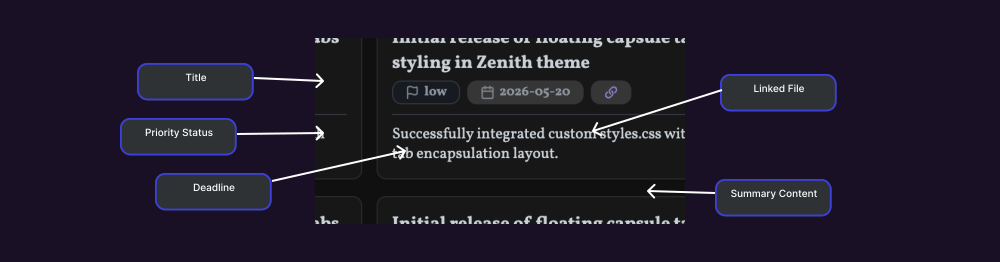
Kanban card design annotation
To mirror this simplicity at the system level, I engineered a seamless data synchronisation flow between the project boards and the calendar tracker. While both plugins are entirely decoupled and perform exceptionally well as independent tools, they actively complement each other when deployed together in the same vault. Tasks, deadlines, and priorities captured on the Kanban canvas automatically map onto the calendar grid, creating a unified, local project pipeline that bridges high-level planning with daily execution without requiring manual data entry or external API bridges.
Contextual Intelligence
Integrating an intelligent assistant directly into a local-first workspace required balancing the deep, system-level power of a Command Line Interface (CLI) with the accessibility and simplicity of a classic chat interface. Because Obsidian runs inside an Electron/Chromium container, it is traditionally isolated from native desktop utilities. This sandboxed architecture presented a distinct engineering hurdle: I needed a way to securely pass full-vault markdown context to a local execution layer without inducing UI lag or introducing complex, heavy cloud middleware.
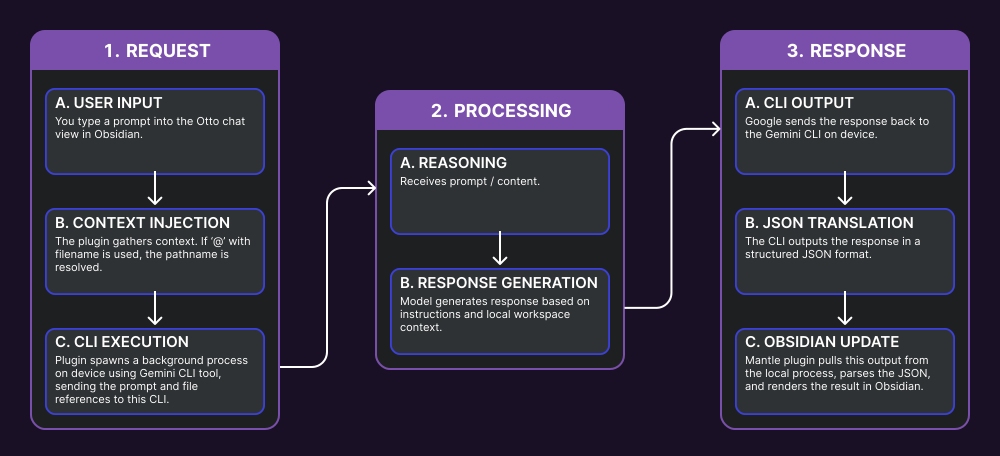
Otto request/response pipeline
The breakthrough involved leveraging the Node.js runtime embedded within the Electron framework to spawn background system child processes that interact directly with a local AI CLI tool. When a user types a prompt and invokes an @filename tag inside the custom "Otto" sidebar, the frontend instantly resolves the precise local filesystem path. The plugin securely pushes this context down to the active background child-process, streams the CLI’s structured JSON output back to the application layer, and parses it dynamically into the live UI thread. This three-tier architecture allows the AI to ingest deep vault context and stream conversational responses entirely in the background, maintaining a seamless, zero-latency user experience without ever blocking active text input.
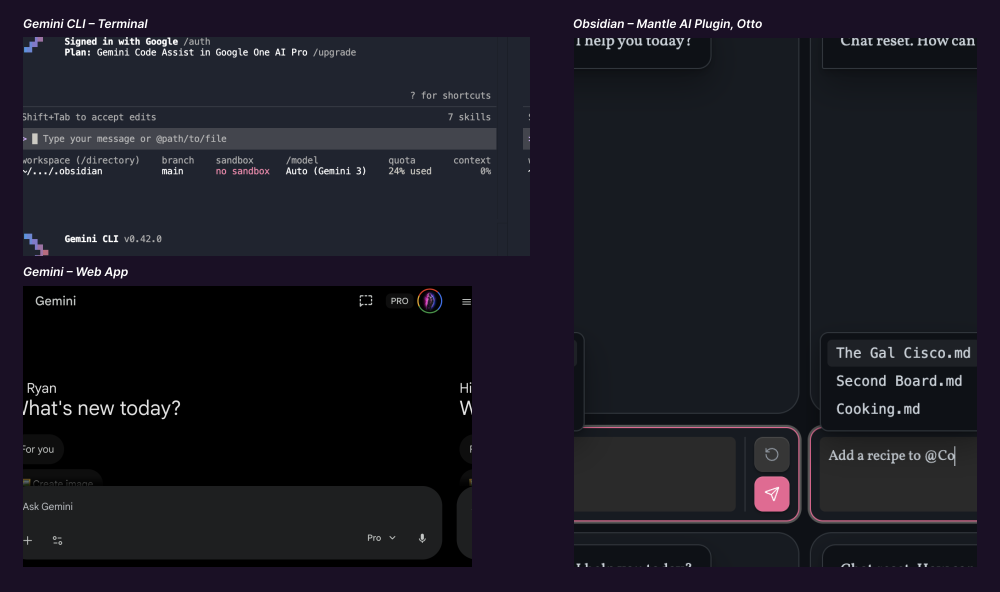
Terminal/Chat UI compared to Otto Plugin
Designing the UI for the Gemini integration posed a unique architectural challenge. AI interfaces typically exist on a spectrum: on one side is a simple, conversational chat interface, and on the other is a powerful Command Line Interface (CLI). Chat is highly accessible but rigid; the CLI offers immense system-level power but a steep learning curve. Mantle bridges this gap with a hybrid design: it presents an accessible chat-style component sidebar (named "Otto") that leverages advanced local CLI capabilities under the hood. It targets key features natively supported by the Gemini CLI, such as quick file referencing, context understanding, and local file operations.
The Goal VS. The Result
Project Mantle has completely transformed my workflow. Obsidian is no longer just an application I occasionally open to scribble down lecture notes; it has become a unified command centre that stays permanently open on my screen. By consolidating my setup into a single pane of glass, I have successfully solved my issues with SaaS fragmentation. I now have a friendly, hospitable digital environment that is always ready to go—free from the constant annoyance of near-daily updates, forced cloud-AI intrusions, or subscriptions being shoved down my throat. Moving to this local-first architecture has given me immense confidence and peace of mind. Having my active projects, university material, and personal journal entries anchored directly to my local machine means the cloud has been rightfully demoted to a passive backup option rather than a vulnerable, primary source of truth.
The deployment phase also brought a major, unexpected technical win. While my explicit goal was to design the Kanban, Calendar, and "Otto" sidebar plugins to be completely modular and standalone, I fully expected to spend time writing tedious CSS styling patches to make them look right in other setups. Instead, community testing proved that their underlying structural design was so resilient that they were ready to go out of the box, adapting flawlessly to other popular themes without needing a single layout tweak. I have chosen the open-source route and published the entire project to GitHub, hoping it can serve as a helpful blueprint for anyone else experiencing the same friction with digital clutter. While this system perfectly matches my personal taste, software is an evolving craft—I am more than happy to receive community feedback, issue reports, or critiques to help refine the project moving forward.